Getting started
From a clone to a running kernel: what Dezh is, the shortest path to a boot, the full build matrix, and running it outside QEMU.
To judge the claims rather than run them, start at REVIEWER_GUIDE.md.
Overview
Dezh OS is a capability-secure operating-system research prototype. It tests a microkernel-shaped design where programs, apps, services, and drivers receive no default authority. Authority is granted explicitly through capabilities, address-space mappings, IPC permissions, device grants, and DMA windows.
Why This Exists
Modern systems still carry many broad authority paths: inherited process authority, global filesystem assumptions, kernel-resident drivers, and service interfaces that blur ownership. Dezh explores a stricter baseline:
No authority exists unless the boot plan, service registry, or caller grants it.
This rule is enforced in the current prototype at several layers:
- syscall capability checks
- U-mode page-table isolation
- explicit device and DMA mappings
- capability-gated IPC
- service-mediated storage
- app registry validation
Current Demonstration
The RISC-V QEMU build demonstrates:
- boot contract validation
- capability-scoped console
- isolated U-mode ELF processes
- user-space virtio-block daemon
- typed IPC status and timeout behavior
- install/root marker on a real disk image
- app install, run, remove, and deny flows
- service stop, restart, and controlled fault recovery
- benchmark and denial suites
The x86_64 build demonstrates the shared Dezh IR path on a second ISA.
What Makes The Prototype Interesting
- No ambient authority: there is no default device, filesystem, block, IPC, or time access for tasks.
- Drivers outside the kernel: the block device is serviced by a U-mode daemon that alone receives the MMIO and DMA grants.
- Typed service contracts: important storage and installer paths return structured statuses instead of raw ad hoc values.
- Service supervision: the console survives service stop and controlled service fault, then restarts the driver explicitly.
- Install path discipline: app install and app private storage go through the registered service path.
- Reviewable evidence: the smoke test and review demo exercise the path end to end under QEMU.
Prototype Boundaries
Dezh is not production-ready. The current work is a research artifact with a small kernel, embedded app bundles, a v0 registry format, and QEMU-centered device support. The point of the current repository state is to make the architecture concrete enough for serious review.
Quickstart
This guide is the shortest path to validating Dezh locally.
Prerequisites
Install:
- Rust stable
- Python 3.10 or newer
- QEMU:
qemu-system-riscv64qemu-system-x86_64
Install Rust targets:
rustup target add wasm32-unknown-unknown
rustup target add riscv64gc-unknown-none-elf
rustup target add x86_64-unknown-none
Clone And Test
git clone https://github.com/alisalimi77/Dezh.git
cd Dezh
cargo test --locked --workspace
Build The Bare-Metal Kernels
cd dezh-boot
cargo build --locked
cd ../dezh-boot-x86
cargo build --locked
cd ..
Run The RISC-V Smoke Test
python tools/ci/qemu_smoke.py riscv64 \
  --kernel dezh-boot/target/riscv64gc-unknown-none-elf/debug/dezh-boot \
  --qemu qemu-system-riscv64
This boots the RISC-V kernel in QEMU with a real temporary disk image and checks the console, service registry, typed IPC, storage path, package path, denial proofs, and benchmark command.
Run The SDK Package Acceptance Test
python tools/ci/sdk_test.py \
  --kernel dezh-boot/target/riscv64gc-unknown-none-elf/debug/dezh-boot \
  --qemu qemu-system-riscv64
This validates that a .dzp package can be built, installed, run, denied,
removed, recovered, updated, rolled back, pinned, unpinned, and garbage
collected through the service-mediated package store.
Run The Public Hygiene Scan
python tools/review/scan_public.py
The scan checks public-facing files for private paths, secret-like tokens, and non-neutral identity/geography markers.
One-Command Review Runner
For a consolidated pass:
python tools/review/run_full_review.py --quick --qemu-riscv qemu-system-riscv64 --qemu-x86 qemu-system-x86_64
Use --full to include the longer SDK package lifecycle acceptance test.
Build and run
This document describes repeatable local validation for Dezh OS.
Toolchain
Required:
- Rust stable
- Python 3.10 or newer
- QEMU RISC-V and x86_64 system emulators
Rust targets:
rustup target add wasm32-unknown-unknown
rustup target add riscv64gc-unknown-none-elf
rustup target add x86_64-unknown-none
Windows PowerShell
If QEMU is installed in the default Windows path:
$QemuRiscv = "C:/Program Files/qemu/qemu-system-riscv64.exe"
$QemuX86 = "C:/Program Files/qemu/qemu-system-x86_64.exe"
Build:
cargo test --locked --workspace
Push-Location dezh-boot
cargo build --locked
Pop-Location
Push-Location dezh-boot-x86
cargo build --locked
Pop-Location
RISC-V smoke:
python tools\ci\qemu_smoke.py riscv64 `
  --kernel dezh-boot\target\riscv64gc-unknown-none-elf\debug\dezh-boot `
  --qemu $QemuRiscv
Interactive RISC-V boot with a local disk image:
fsutil file createnew dezh-local.img 2097152
& $QemuRiscv `
  -machine virt `
  -nographic `
  -bios default `
  -kernel dezh-boot\target\riscv64gc-unknown-none-elf\debug\dezh-boot `
  -drive file=dezh-local.img,format=raw,if=none,id=dezhdisk `
  -device virtio-blk-device,drive=dezhdisk
At the prompt, try:
help
status
services
ipc-typed-demo
install run
pkg-store
bench-all
halt
Linux
Install QEMU using the distribution package manager. On Debian or Ubuntu:
sudo apt-get update
sudo apt-get install -y qemu-system-misc qemu-system-x86
Build:
cargo test --locked --workspace
(cd dezh-boot && cargo build --locked)
(cd dezh-boot-x86 && cargo build --locked)
Run:
python tools/ci/qemu_smoke.py riscv64 \
  --kernel dezh-boot/target/riscv64gc-unknown-none-elf/debug/dezh-boot \
  --qemu qemu-system-riscv64
macOS
Install QEMU with Homebrew:
brew install qemu
Build and smoke commands are the same as Linux.
Review Validation
Run the consolidated quick review:
python tools/review/run_full_review.py --quick
Run the longer review path:
python tools/review/run_full_review.py --full
The full path runs public hygiene checks, host tests, RISC-V and x86_64 builds, RISC-V QEMU smoke, review demo transcript generation, and SDK package lifecycle acceptance.
Troubleshooting
If QEMU is not found, pass the full path using --qemu, --qemu-riscv, or
--qemu-x86, depending on the script.
If the RISC-V console appears but the Enter key does not work in a terminal, use the scripted smoke runner. The console accepts carriage return and newline, but some terminal pipelines buffer input differently.
If package commands fail with virtio-block unavailable, confirm that QEMU was
started with:
-drive file=...,format=raw,if=none,id=dezhdisk
-device virtio-blk-device,drive=dezhdisk
Running in a VM
Two ways to see Dezh boot, one per architecture. Neither needs the source tree — just a released artifact and a VM. Both show the same thesis in action: a program (here, an agent package) can only do what it was granted.
x86_64 in VirtualBox or VMware (bootable ISO)
This is the "install it like a real OS" path.
- Download
dezh-<tag>-x86_64.isofrom the release. - Create a new VM: type Other / Unknown (64-bit), 128 MB RAM, no hard disk.
- Attach the ISO as the VM's optical (CD/DVD) drive.
- Start the VM.
The kernel boots through GRUB into 64-bit long mode and runs a real .dzp agent
package on screen: it verifies the package (kind=dezh-ir, name=agent-sum), runs
the capability-gated agent (prints 15), then runs it again without the print
capability and the kernel denies it. Output goes to the VGA screen (shown
below) and to COM1 serial.
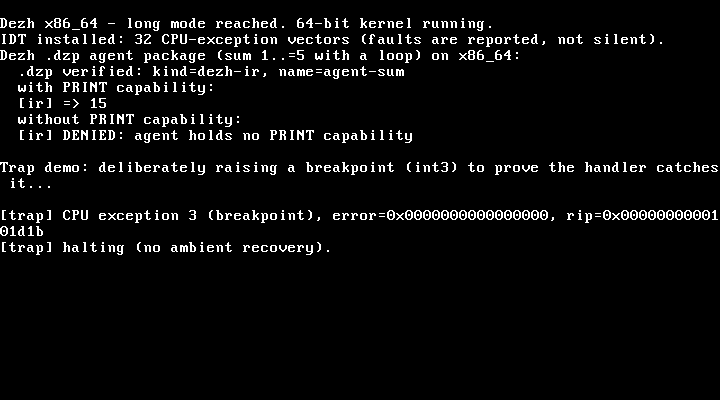
The boot also installs a 256-vector IDT and exercises both kinds of trap. The first 32 vectors are CPU exceptions, and the boot deliberately raises a breakpoint at the end to prove faults are caught and reported (not a silent triple-fault reset) before halting. The rest are interrupts, which must not halt: a Local APIC timer is armed at 100 Hz from a rate measured against the PIT, and the kernel keeps a work loop running through the ticks to show the interrupted work resumes intact. The boot then preempts three kernel tasks that never yield; runs two ring-3 tasks in separate address spaces, one of which touches memory it was not given and is killed while the other finishes; and finally runs two more whose code and manifest are identical but whose intents are not, so one of them is refused a capability by name. Device IRQs, storage and an effect ledger on x86 are still future work — see ROADMAP.md.
x86_64 in QEMU (same ISO)
qemu-system-x86_64 -cdrom dezh-<tag>-x86_64.iso -serial stdio
RISC-V in QEMU (one-liner)
The RISC-V kernel is an interactive capability console — the richest demo surface (agent containment, Cairn rollback, the Linux personality, benchmarks).
# optional: a disk enables reboot-persistent Cairn state
qemu-img create -f raw dezh-disk.img 4M

qemu-system-riscv64 -machine virt -nographic -bios default \
  -kernel dezh-<tag>-riscv64-qemu-kernel.elf \
  -drive file=dezh-disk.img,format=raw,if=none,id=hd0 \
  -device virtio-blk-device,drive=hd0
At the dezh> prompt, try:
| Command | Shows |
|---|---|
caps | the console's own capabilities |
linux-elf | a real unmodified Linux/RISC-V ELF run under the Pol personality (F4) |
cairn-demo | versioned storage: commit, roll back, cross-namespace denial (F2) |
agent | a .dzp agent: works in-grant, denied beyond it (F1/F3) |
bench-pol | measured Pol syscall-translation overhead (F4/D015) |
help | the full command list |
Exit with halt.